.png?width=250&height=58&name=LGB_Logo%20Orange%20(1).png)
Receiving unexpected or unusual emails can happen from time to time. If something feels off, it is always best to report it so our Technology team can review and help keep your account safe. Outlook includes built-in options that allow you to quickly report these emails.
What is a suspicious email?
A suspicious email is any message that seems unusual, unexpected, or unsafe.
It may:
- Look like it comes from a trusted source (like LanguageBird or Microsoft), but feels off
- Ask you to click a link or download an attachment
- Ask for personal information, such as passwords
- Create urgency (for example, “your account will be locked”)
These types of emails are often called phishing emails, which are designed to trick you into sharing information.
If something does not feel right, trust your instincts and do not interact with the email.
What is junk email?
Junk email (also called spam) refers to unwanted messages that are not necessarily harmful but are irrelevant or sent in bulk.
These emails may include:
- Advertisements
- Promotional messages you did not sign up for
- Repetitive or irrelevant content
How do I report an email in Outlook?
To report a suspicious or unwanted email:
- Open the email in Outlook: outlook.office.com
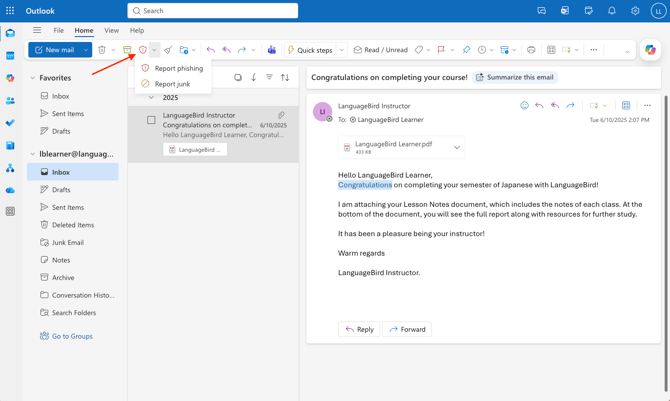
- In the top toolbar (ribbon), click Report
- Select one of the following options:
- Report phishing → if the email looks suspicious or unsafe
- Report junk → if the email is unwanted or spam
What happens after I report an email?
Once you report an email:
- Our Technology team is notified automatically
- The email is reviewed for potential risks
- Any necessary actions are taken to help protect your account and others
Reporting emails helps improve security for everyone.
Important tips
- Always double-check the sender’s email address
- Avoid clicking links in unexpected emails
- When in doubt, report the message
Need Additional Help?
Our support team is ready to quickly resolve your tech issues. Share details like your device, browser, and error messages for faster assistance.