.png?width=250&height=58&name=LGB_Logo%20Orange%20(1).png)
If you use a Microsoft account (personal, school, or professional), you can sync the MyLanguageBird calendar with your Outlook calendar so your scheduled lessons appear alongside your other events.
How to sync your calendar
-
Log in to MyLanguageBird.
-
Navigate to the Calendar page.
-
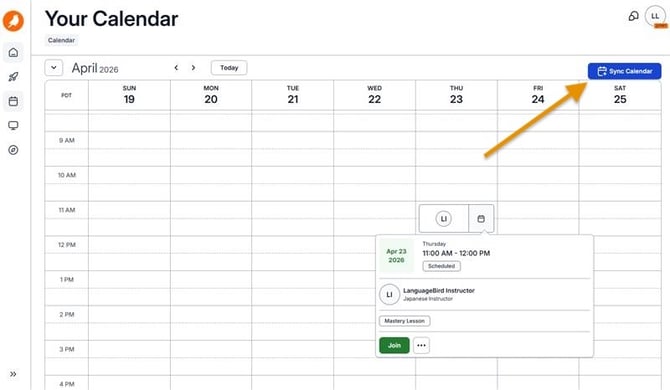
In the top-right corner, click the calendar sync button.
-
Follow the prompts to complete the connection.
Once connected, your scheduled lessons will automatically appear in your Outlook calendar.
Lessons cannot be joined directly from your personal calendar. The sync is intended to help you keep track of lesson dates and times, avoid missing sessions, and stay organized with your schedule.
Important: Lessons cannot be rescheduled from Outlook. To make any changes to your lesson schedule, please use the MyLanguageBird platform calendar.
Need Additional Help?
Our support team is ready to quickly resolve your tech issues. Share details like your device, browser, and error messages for faster assistance.